RTNET SOLUTION Co., Ltd. (hereinafter referred to as the
“Company”) places great importance on protecting users’ personal
information and makes every effort to ensure that personal
information provided online while using the Company’s services
(hereinafter referred to as the “Company Services” or the
“Company”) is protected.
Accordingly, the Company complies with the personal information
protection provisions of applicable laws and regulations that
information and communications service providers must observe,
including the Protection of Communications Secrets Act, the
Telecommunications Business Act, the Act on Promotion of
Information and Communications Network Utilization and related
laws, as well as the personal information protection guidelines
established by the Ministry of Information and Communication.
Through this Privacy Policy, the Company informs users of the
purposes and methods for which the personal information they
provide is used and the measures taken to protect personal
information.
The Company makes this Privacy Policy available on the first
page of its website so that users can easily review it at any
time. This Privacy Policy may be amended from time to time due
to changes in government laws and guidelines or changes in the
Company’s internal policies, and the Company maintains the
procedures necessary for continuous improvement of the Privacy
Policy. When this Privacy Policy is amended, the Company will
immediately post the changes on the website and assign a version
number and revision date so that users can easily identify the
amended matters. Users are advised to review the Policy from
time to time when visiting the site.
This Privacy Policy contains the following items.
A. Consent to the collection of personal information
B. Purpose of collection and use of personal information
C. Items of personal information collected by the Company and
collection methods
D. Retention and use period of personal information collected by
the Company
E. Sharing and provision of personal information collected by
the Company
F. Management of users’ own personal information, including
access, correction, and deletion
G. Operation of cookies
H. Technical and managerial measures related to personal
information
I. Outsourcing of personal information processing
J. Collection of opinions and handling of complaints related to
personal information
K. Protection of children’s information
L. Department, name, and contact information of the Company’s
personal information manager and staff in charge
M. Customer center information
A. Consent to the collection of personal information
The Company provides a procedure through which users may click
an “Agree” button or a “Cancel” button regarding the Company’s
Privacy Policy or Terms of Use. If a user clicks the “Agree”
button, the user is deemed to have consented to the collection
of personal information.
B. Purpose of collection and use of personal information
Personal information means information about a living individual
that can identify the individual by name, resident registration
number, or other information included in the relevant
information, including information that by itself cannot
identify a specific individual but can be easily combined with
other information to identify the individual. Most Company
Services may be used at any time without separate user
registration.
However, the Company collects users’ personal information in
order to provide more improved and higher-quality services,
including customized services, through member services and
similar services. The Company does not disclose users’ personal
information without prior consent and uses collected information
as described below.
First, the Company may develop more useful services based on
personal information provided by users. When developing new
services or expanding content, the Company may more efficiently
determine service priorities based on personal information
provided by existing users and may reasonably select and provide
content that users need.
Second, most information and services provided by the Company
are free of charge. To provide these free services, the Company
posts advertisements. Based on accurate personal information
about users, the Company may deliver appropriate advertisements
and content to each service or menu, which ultimately becomes
another form of valuable information provided to users. The
Company only receives advertisements from advertisers and
displays advertisements to the types of users targeted by the
advertisers; it never shows or provides users’ personal
information to advertisers.
Third, collected personal information may be provided to partner
companies.
Fourth, the purpose of collecting each type of information is as
follows.
1. Name, date of birth, gender, ID, and password: identity
verification according to service use and provision of
age-restricted services
2. Email address and telephone number: delivery of notices,
confirmation of the user’s intent, securing smooth communication
channels for complaint handling, and provision of the latest
information such as new services, new products, and events
3. Bank account information, credit card information, mobile
phone number, and telephone number: payment of fees for paid
information use
4. Address and telephone number: securing accurate delivery
destinations for invoices and goods
5. Date of birth, gender, and address: demographic analysis
6. Other optional items: materials for providing personalized
services
C. Items of personal information collected by the Company and
collection methods
When users register as members to use member services, the
Company receives essential information required for service
provision through online input. Essential information collected
during membership registration includes name, date of birth,
gender, email address, address, and telephone number. In
addition, the Company may receive optional information entered
by users, such as mailing service preferences, in order to
provide higher-quality services.
The Company may also request users to selectively enter personal
information for statistical analysis or prize provision in
connection with surveys or events conducted by the Company.
However, the Company will, as much as possible, not collect
sensitive personal information that may infringe upon users’
basic human rights, such as race and ethnicity, ideology and
creed, place of origin and registered domicile, political
orientation and criminal records, health status, and sex life.
If the Company must inevitably collect such information, it will
obtain users’ prior consent.
In all cases, the information entered will not be used for
purposes other than those disclosed to users in advance and will
not be disclosed externally. This Privacy Policy does not apply
to the collection of personal information by websites linked
from the Company’s website.
D. Retention and use period of personal information collected by
the Company
While users use services provided by the Company as members, the
Company continuously retains users’ personal information and
uses it for service provision and related purposes.
However, information directly deleted or modified by the member
through the procedures and methods described in “F. Management
of users’ own personal information, including access,
correction, and deletion,” or information for which membership
withdrawal is requested, will be completely deleted from disk by
a method that prevents restoration and will be processed so that
it cannot be viewed or used later. Personal information entered
for temporary purposes, such as surveys or events as described
in “C. Items of personal information collected by the Company
and collection methods,” will also be processed in the same
manner so that it cannot be restored after the purpose has been
achieved.
As a principle, personal information will be destroyed once the
purpose of collecting or receiving the personal information has
been achieved.
E. Sharing and provision of personal information collected by
the Company
The Company uses users’ personal information within the scope
notified in “B. Purpose of collection and use of personal
information” and does not use it beyond that scope or disclose
users’ personal information externally without prior consent in
principle. However, exceptions may apply in the following cases.
First, where users have consented in advance to disclosure.
Second, where a user violates the Terms of Use or other terms or
policies for member services posted on the website.
Third, where there are sufficient grounds to determine that
personal information must be disclosed in order to take legal
action because a user has caused mental or material damage to
another person by using the Company Services.
Fourth, where disclosure is deemed in good faith to be required
by other laws, such as where a government or investigative
agency makes a request through lawful procedures under
applicable laws.
Fifth, where information is provided to partner companies,
research organizations, or similar entities in a form that
cannot identify a specific individual for statistical
compilation, academic research, or market research.
Sixth, where personal information necessary for handling
complaints and inquiries arising from users’ service use is
provided to a specialized company that operates the customer
center described in “M. Customer center information.”
In addition, the Company may share users’ personal information
for the development of new technologies or the provision of
better services. In such cases, before collecting or providing
information, the Company will inform users of the institution or
organization with which personal information will be shared,
what information is needed and why, and how and until when it
will be protected and managed, and will go through a procedure
to obtain consent. If users do not consent, the Company will not
arbitrarily collect or share additional information. Even when
advertisements are posted or sent to groups based on gender,
age, or other specific conditions, users’ personal information
will not be provided to individuals or companies requesting the
advertisements, and when information is needed for statistical
processing, academic research, or market research, it will be
provided only in a form that cannot identify a specific
individual.
F. Management of users’ own personal information, including
access, correction, and deletion
Users may access or modify their registered personal information
through the Company website at any time and may also request
membership withdrawal.
To access or modify personal information, users may log in
through the Company’s member management menu using their ID and
password. All entered items may be modified except for the user
ID, date of birth, and name.
If a user has forgotten the password, the user may click “Find
ID/PW” and enter the information necessary for identity
verification. After verifying the user’s identity, the Company
will provide the password by email. Users may withdraw or
terminate use of their member ID for the Company Services. In
such cases, users should contact the administrator by email or
telephone.
G. Operation of cookies
To provide customized services tailored to users, the Company
uses cookies that store and retrieve user information from time
to time. A cookie is a small amount of information sent by the
server (HTTP) used to operate a website to the user’s computer
browser, and it may be stored on the hard disk of the user’s PC.
Users must allow cookies in order to access the Company, log in,
and use member services.
The Company uses cookies to identify information about IDs in
order to provide services that are suitable and more useful to
users. Cookies identify a user’s computer but do not personally
identify the user.
By using cookies, the Company can understand visit and usage
patterns for each Company service and website, popular search
terms, user scale, and similar information, create and provide
more convenient services, and provide optimized information to
users. Users may choose whether to use cookies. By configuring
options in the web browser, users may allow all cookies, require
confirmation each time a cookie is stored, or refuse the storage
of all cookies. However, if users refuse to store cookies, some
Company services that require login may not be available.
H. Technical and managerial measures related to personal
information
In handling users’ personal information, the Company takes the
following technical measures to ensure security so that personal
information is not lost, stolen, leaked, altered, or damaged.
Users’ personal information is thoroughly protected by
passwords. The password for a member ID is known only to the
user, and personal information may be viewed or changed only by
the user who knows the password. Therefore, users must not
disclose their passwords to anyone. For this purpose, the
Company generally recommends that users log out online and close
the web browser after using the service on a PC.
These procedures are particularly necessary when users share a
PC with others or use the service in public places, such as
companies, schools, libraries, or internet cafés, in order to
prevent personal information from being disclosed to others.
The Company does its best to prevent members’ personal
information from being leaked or damaged due to hacking,
computer viruses, and similar risks. To prepare for damage to
personal information, the Company backs up data from time to
time, uses the latest antivirus programs to prevent users’
personal information or data from being leaked or damaged, and
uses encryption algorithms and similar measures to transmit
personal information safely over networks. The Company also
controls unauthorized external access by using intrusion
prevention systems and strives to equip itself with all possible
technical devices to secure system stability.
The Company limits employees who handle personal information to
personnel in charge, grants them separate passwords and renews
them regularly, and emphasizes compliance with this Privacy
Policy through frequent training. In addition, through an
internal organization dedicated to communications
confidentiality and similar measures, the Company checks the
implementation of this Privacy Policy and the compliance status
of personnel in charge, and strives to correct and rectify any
issues immediately when they are found.
I. Outsourcing of personal information processing
The Company may outsource the processing of users’ personal
information to external specialized companies in order to
improve services. If personal information processing is
outsourced, the Company will notify users of such fact in
advance.
In addition, through outsourcing agreements and similar
arrangements, the Company will clearly stipulate compliance with
personal information protection instructions by the service
provider, confidentiality of personal information, prohibition
of provision to third parties, and liability in the event of an
incident, and will keep the relevant agreement in writing or
electronically.
J. Collection of opinions and handling of complaints related to
personal information
The Company collects users’ opinions regarding personal
information protection and has all procedures and methods in
place to handle complaints. Users may report complaints by
telephone or email by referring to “L. Department, name, and
contact information of the Company’s personal information
manager and staff in charge” below, and the Company will provide
prompt and sufficient responses to users’ reports.
Users may also file complaints with the Personal Information
Infringement Report Center operated by the government
(http://www.cyberprivacy.or.kr, Tel. 02-1336, PC communication
go eprivacy), the ePrivacy Mark Certification Committee
(www.privacymark.or.kr, 02-580-0533), or the National Police
Agency (www.police.go.kr).
K. Protection of children’s information
Under current law, children under the age of 14 must fully
understand the purpose of collection and use of personal
information and obtain consent from their legal representative
before sending personal information to others online.
Accordingly, the Company explains the above matters through
membership terms, service rules, and similar documents, and
checks whether parental consent has been obtained at the time of
registration. The Company sends an email to the legal
representative and asks the legal representative to indicate
consent and reply by email. Personal information collected from
a child’s legal representative will be used only to confirm
whether consent has been given.
The legal representative of a child under the age of 14 may
request access to, correction of, or withdrawal of consent
regarding the child’s personal information, and the Company will
take necessary measures without delay upon such request.
L. Department, name, and contact information of the Company’s
personal information manager and staff in charge
The Company does its best to ensure that users can use good
information safely. If an incident occurs that is contrary to
the matters notified to users regarding personal information
protection, the personal information manager will be
responsible.
Responsibility for maintaining the security of the password for
the user ID related to personal information lies with the user.
The Company does not directly ask users for their passwords in
any manner, so users must take special care to prevent their
passwords from being disclosed to others. In particular, users
should exercise greater caution when connected online in public
places, as described in “H. Technical and managerial measures
related to personal information.”
The Company has designated a personal information manager and
staff in charge of collecting opinions and handling complaints
regarding personal information, and the contact information is
as follows.
|
Personal Information Management Manager and Staff
|
| Name |
RTNET SOLUTION Co., Ltd. |
| Department |
RTNET SOLUTION Co., Ltd. |
| E-Mail |
rtnetsol@rtnet.co.kr |
M. Customer center information
Address: RTNET Building, 827-64 Yeoksam-dong, Gangnam-gu, Seoul
/ 40, Teheran-ro 8-gil, Gangnam-gu, Seoul 06240, Korea
(Yeoksam-dong, RTNET Building)
Contact: Tel. 02-6080-4133 / Fax. 0503-8379-4383
For other consultations regarding personal information, users
may contact the Personal Information Infringement Report Center
or similar organizations.
Personal Information Infringement Report Center:
www.cyberprivacy.or.kr, Tel. 02-1336




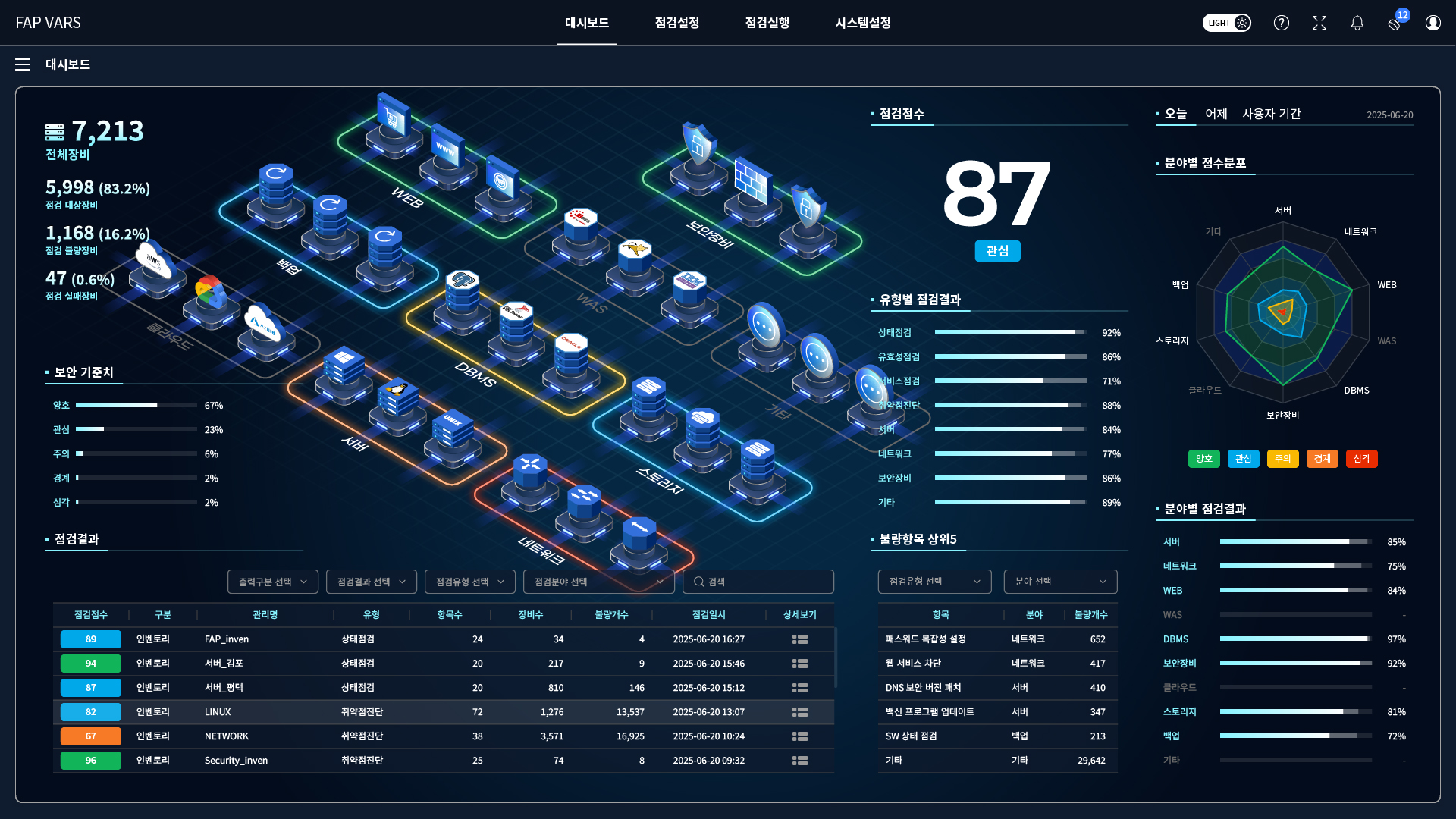
 Dashboard
 Check
overall inspection status
Check
overall inspection status
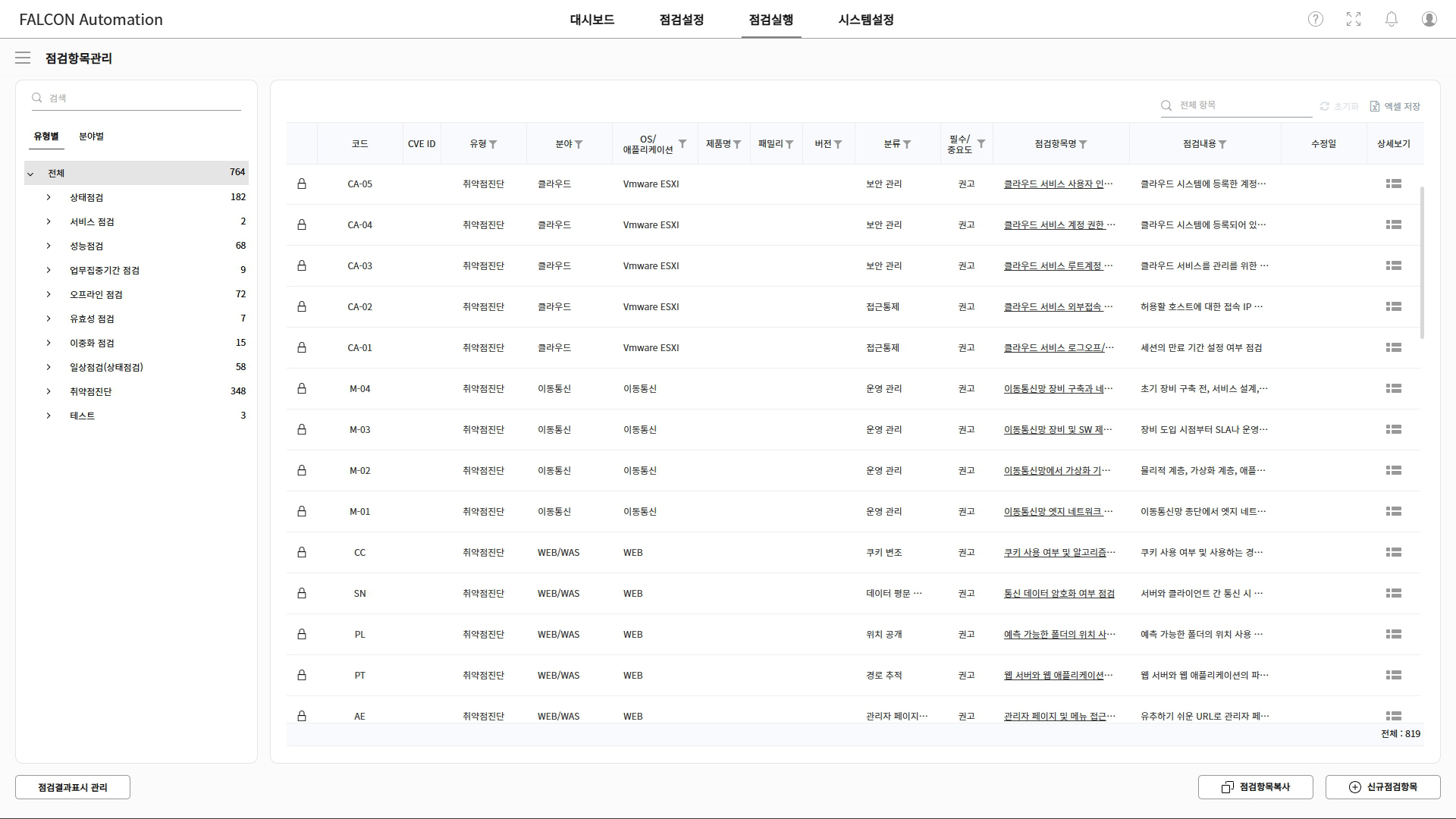
 Inspection Items
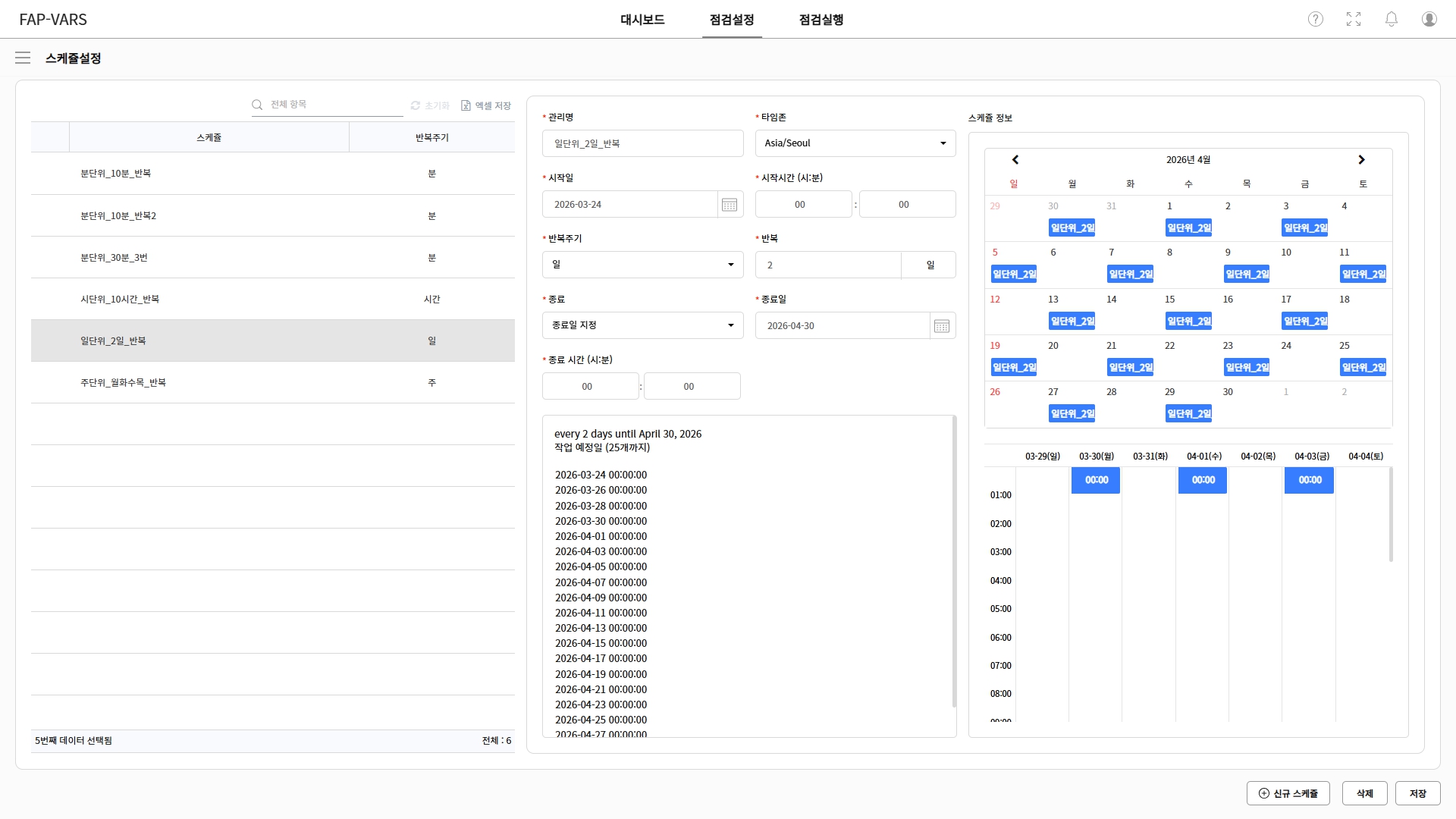
 Schedule Settings
 Inspection Execution
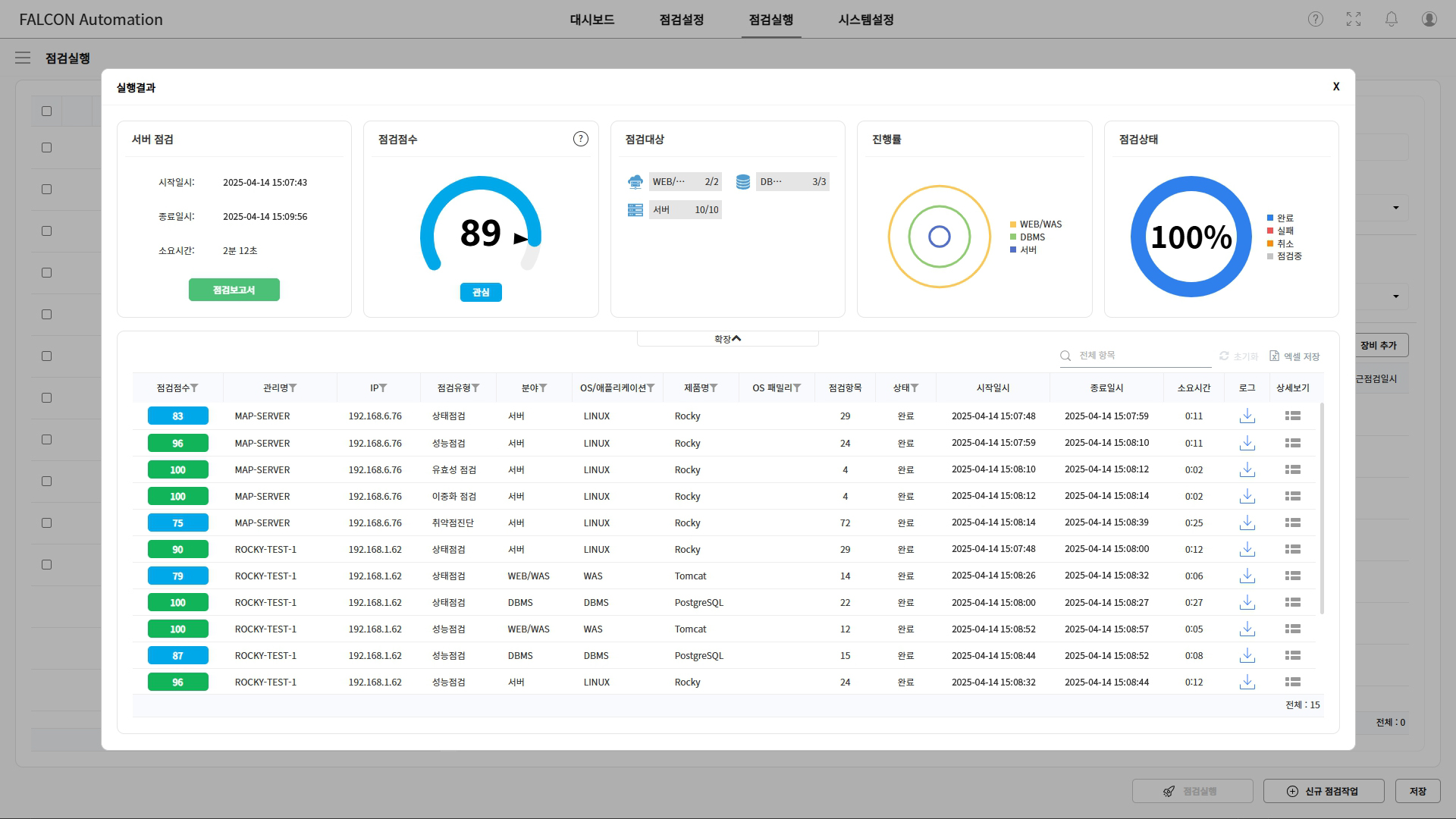
 Inspection Results
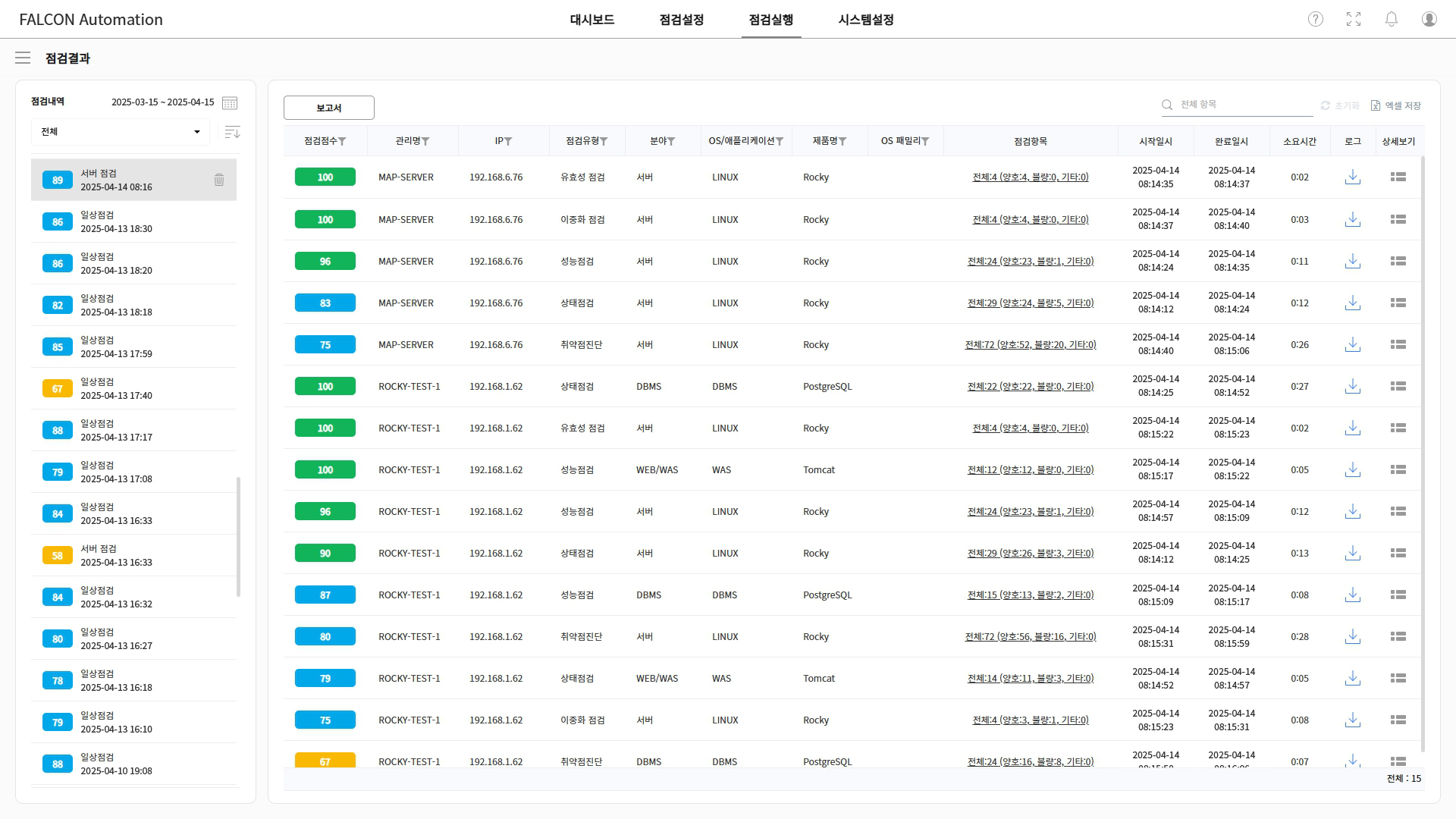
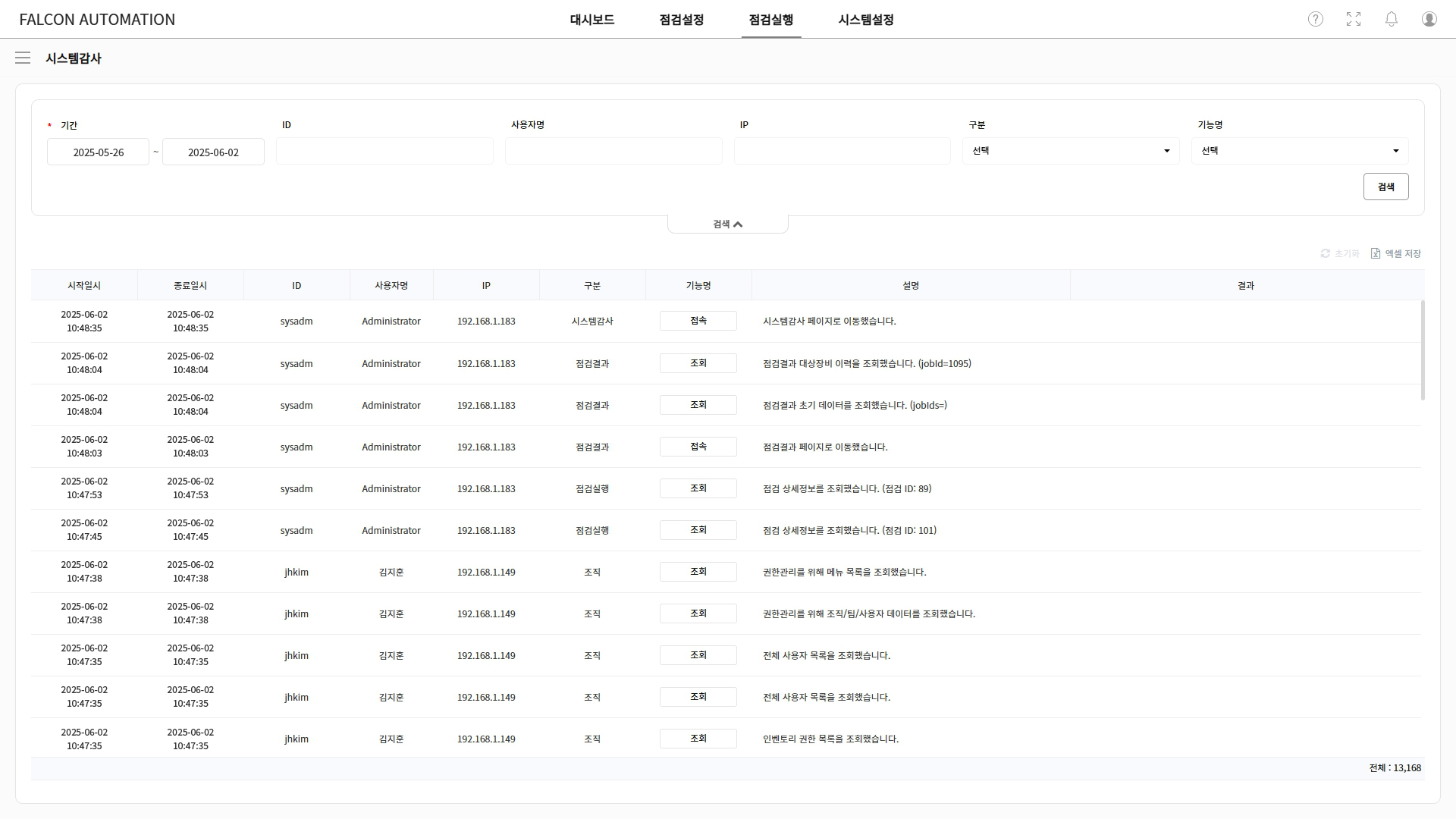
 System Audit